Creating Your Account
RVThinker requires an account so that your RVs, listings, and price history are saved securely and available any time you sign in.
Registration Options
You can create your account in two ways:
Option A — Email & Password
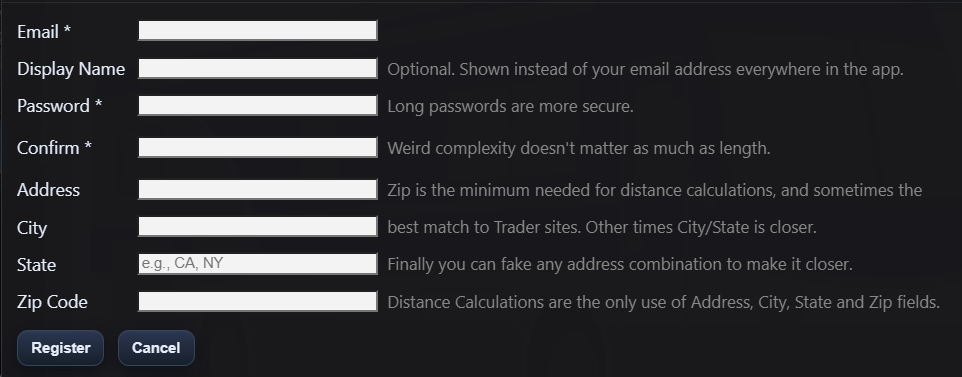
- From the landing page, click Register.
- Enter your email address — this is also your login name.
- Choose a password. RVThinker favors length over complexity: a longer passphrase ("correct horse battery staple") is stronger than a short cryptic one ("P@s5!").
- Confirm the password by typing it again.
- Optionally fill in your display name — this is what other users see if you send messages. If you leave it blank, your email is used.
- Optionally enter your address, city, state, and zip code. The zip code is used to calculate how far each RV is from you. You can add or change this later in your profile.
- Click Register.
The address fields are entirely optional, but the zip code is particularly useful. When you add a listing and enter the seller's zip code, RVThinker calculates the driving distance from your location. This saves you from constantly looking up distances on a map.
Option B — Social Login
If you prefer not to create yet another password, you can sign in with one of the supported providers:
- Microsoft
- GitHub
Simply click the corresponding button on the login or register screen. RVThinker will redirect you to that provider to authorize access, then bring you back. No RVThinker-specific password is needed.
The first time you sign in with a social provider, RVThinker may ask you to choose a display name. This is a one-time step — after that, you'll go straight to your garage.
After Registration
Once your account is created you'll land in your garage. If it's empty (which it will be), RVThinker offers to load demo RVs so you can explore the interface with sample data before adding your own. See First-Time Setup for details.
Registration Closed?
If you see a message that registration is currently closed, it means the site has reached its capacity limit. Contact the site administrator through other channels — they can increase the limit or manually create your account.